The Reactive Character Sheet
Pattern: Portals & Context-Aware Logic
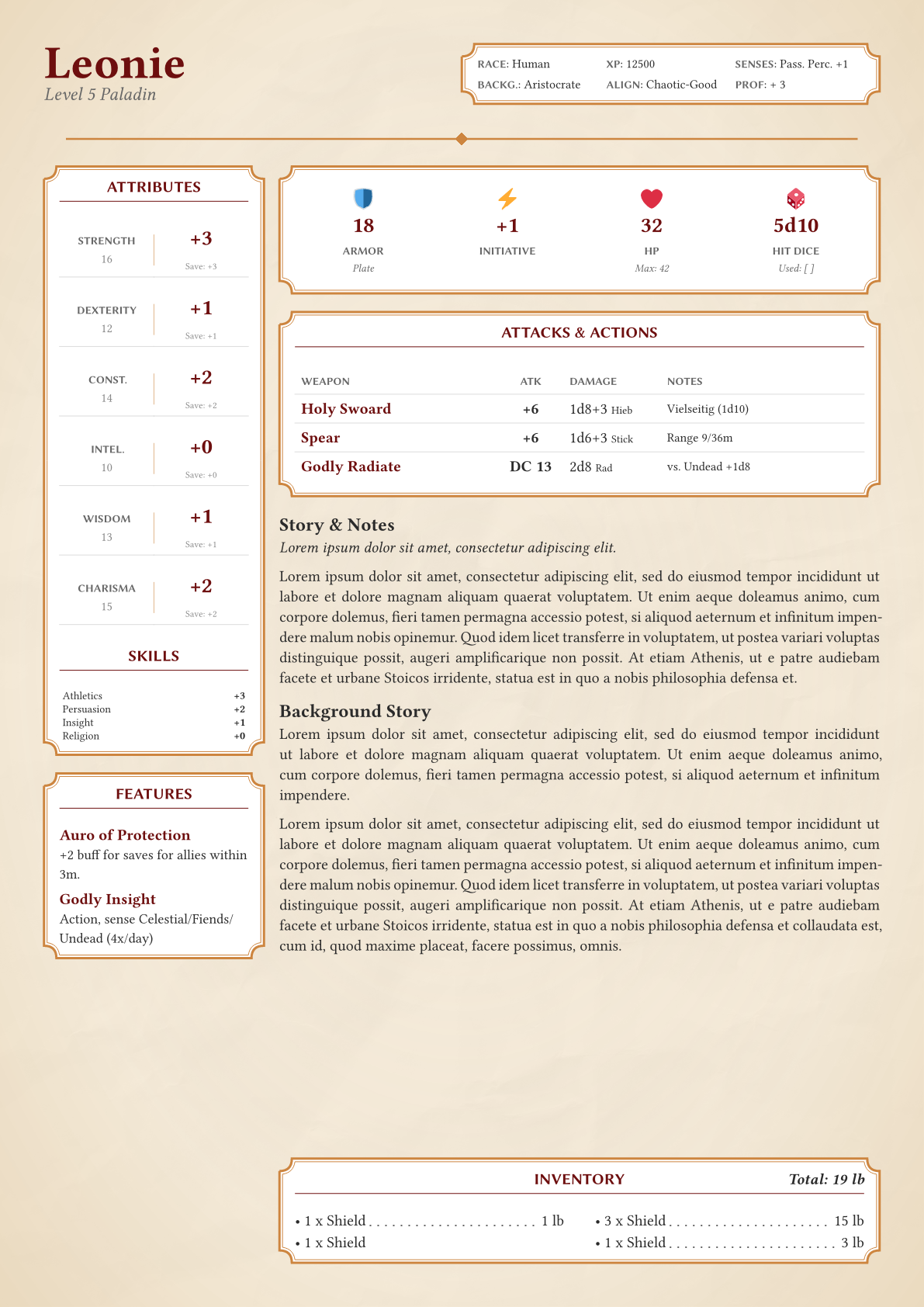
This showcase demonstrates how Loom can manage complex game rules and non-linear layouts. We will build a D&D 5e Character Sheet where stats calculate their own modifiers, and content acts as "Portals," teleporting from the text flow into specific layout slots (like a sidebar).
The Challenge
In standard Typst, creating this document is difficult because:
- Linearity: You cannot define sidebar content inside your main story text and expect it to jump to the left column.
- Logic Separation: Calculating a modifier (e.g., Score 16 -> +3) usually requires mixing functions into your content.
- responsiveness: You want the same component to look different if it's in a wide body vs. a narrow sidebar.
The Loom Solution
We use two advanced Loom patterns:
- Portals (Teleportation): A
portalcomponent signals its content up to the root, which thenconnectsit to a specific grid cell (e.g., "sidebar"). - Smart Components (Logic): The
hero-statscomponent manages its own math. It reads global context (proficiencies) and calculates derived stats (modifiers) automatically.
1. The User Experience (API)
The user focuses purely on data and storytelling. Notice how the #sidebar content is written inline with the story but renders in the left column.
// my-character.typ
#import "character-sheet.typ": *

#show: character-sheet.with(
  name: "Leonie",
  class: "Paladin",
  level: 5,
  prof-bonus: 3 // Global Context
)

// This content "teleports" to the sidebar!
#sidebar[
  #hero-stats(
    stats: (str: 16, dex: 12, con: 14, int: 10, wis: 13, cha: 15),
    proficiencies: ("wis", "cha")
  )

  #features({
    feature("Aura of Protection")[+2 buff for allies within 3m.]
  })
]

== Story & Notes
_#lorem(8)_
#lorem(80)
2. The Portal Pattern (Layout Teleportation)
The "Portal" allows us to break the linear flow. The character-sheet layout defines specific slots (sidebar, bottom, body). The connect motif collects all signals and places them into the correct grid cells.
// character-sheet-layout.typ
#let connect(body) = lw-layout.motif(
  measure: (_, child-data) => {
    // 1. COLLECT: Gather all "portal" signals (sidebar, bottom)
    let portals = loom.query.collect-signals(child-data, kind: "portal")

    // 2. ORGANIZE: Return them as a dictionary
    (none, portals)
  },
  draw: (_, _, view, body) => {
    // 3. DISTRIBUTE: Place content in the grid
    grid(
      columns: (5cm, 1fr), // Sidebar | Body
      gutter: 1em,

      // Render the sidebar content collected from deep within the document
      view.at("sidebar", default: []),

      // Render the main body flow
      body
    )
  },
  body
)

// Helper to create a portal
#let portal(target, body) = lw-layout.data-motif(
  "portal",
  measure: (..) => (target: target, body: body)
)
3. The Smart Component (Logic & Adaptability)
The hero-stats component is more than just a table. It is a calculator that adapts its visual style based on available space.
// components/adaptive-stats.typ
#let hero-stats(stats: (:), proficiencies: ()) = managed-motif(
  "hero-stats",

  // A. MATH PHASE
  measure: (ctx, _) => {
    // 1. Calculate Modifiers (Logic)
    // Score 16 -> +3 Modifier
    let calculated-stats = stats.pairs().map(((stat, score)) => {
      let mod = rules.score-to-mod(score)
      let is-proficient = stat in proficiencies

      // Read global context (prof-bonus) injected by the root
      let save = mod + if is-proficient { ctx.prof-bonus } else { 0 }

      (stat, (score: score, mod: mod, save: save))
    }).to-dict()

    (none, calculated-stats)
  },

  // B. DRAW PHASE
  draw: (ctx, _, view, _) => {
    layout(size => {
      // 2. Responsive Switching
      // If narrow (Sidebar), use a list. If wide (Body), use a grid.
      if size.width < 10cm {
        render-compact-list(view)
      } else {
        render-wide-grid(view)
      }
    })
  },
  none
)
Key Takeaways
- Teleportation: Use the Portal Pattern to move content from the linear flow into headers, footers, or sidebars without forcing the user to split their code.
- Encapsulated Logic: Components like
hero-statshandle the math (16 -> +3). The user provides raw data; the component provides the rules. - Context Awareness: Components can read global state (like
prof-bonusorlevel) provided by the root wrapper to adjust their calculations automatically.