Plain
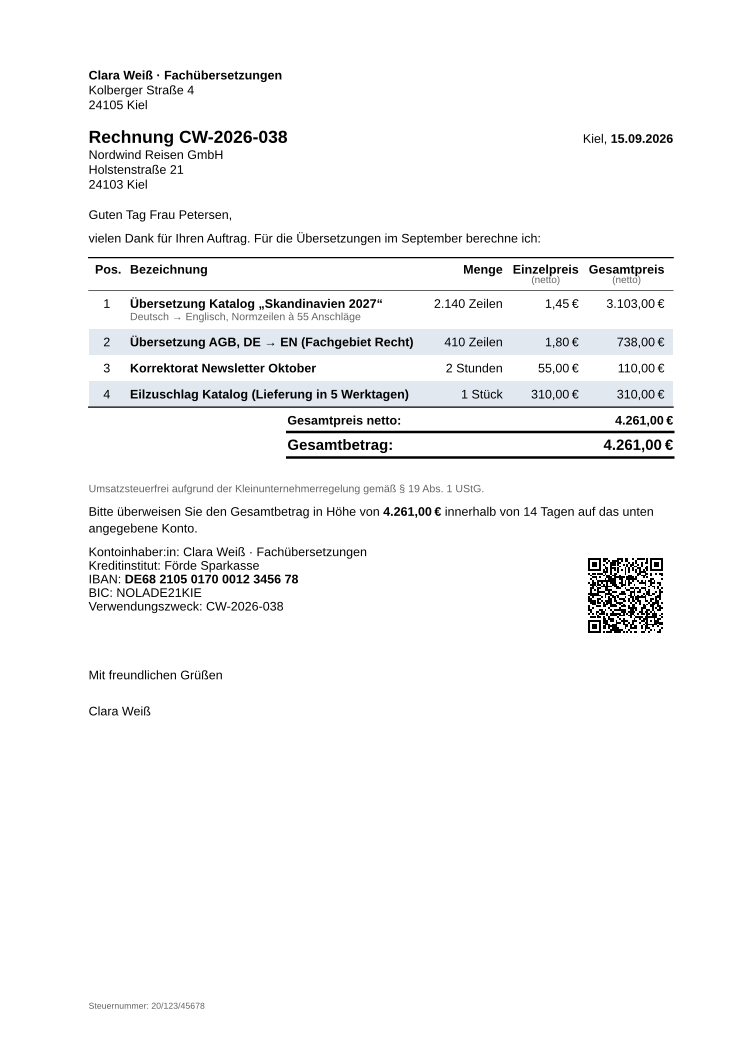
The classic look without furniture: no letterhead zone, no envelope window, no marks. The sender, the title and the recipient simply flow at the top of the text, and the registration data sits in a small footer. Use it for your own letterhead paper, for minimal documents, and as the base of your own formats.
| Preset | theme.plain |
|---|---|
| Best for | freelancers, pre-printed letterhead paper, receipts and custom formats |
| Default layout | plain on the sender's paper: A4, US Letter in the US |
| Output | PDF, and print on your own letterhead paper |
| Fonts | Liberation Sans (fallback: Libertinus Serif) |
| Stability | frozen: the look does not change in 0.6.x |
Quick Start
Copy this into a .typ file and compile it:
#import "@preview/invoice-pro:0.6.0": *

#show: invoice.with(
  theme: theme.plain, // no letterhead and no marks: everything in the text flow
  locale: locale.en-de,
  tax-exempt-small-biz: true, // small business: no VAT, the legal note is added
  sender: (
    name: "Clara Weiss Translations",
    address: "Kolberger Straße 4",
    city: "24105 Kiel",
    tax-nr: "20/123/45678",
  ),
  recipient: (
    name: "Nordwind Travel GmbH",
    address: "Holstenstraße 21",
    city: "24103 Kiel",
  ),
  invoice-nr: "CW-2026-038",
)

#line-items[
  #item(
    [Translation of the 2027 catalogue, German to English],
    quantity: 2140,
    unit: "lines",
    price: 1.45,
  )
  #item(
    [Proofreading, October newsletter],
    quantity: 2,
    unit: unit.hour,
    price: 55,
  )
]

#payment-terms(days: 14)
#bank-details(
  bank: "Förde Sparkasse",
  iban: "DE75512108001245126199",
  bic: "SOLADEST600",
)
#signature(name: "Clara Weiss")
What You Get
- The sender's name and address, then the title with number and date, then the recipient, all in the text flow.
- The classic items table, totals, bank details and EPC-QR code.
- A small footer with the tax number or VAT ID and the register entry.
- No letterhead zone, no window position, no fold or punch marks, no continuation header and no page numbers.
Make It Yours
On pre-printed letterhead paper the paper already carries your name, address and legal data. Tell the theme so, remove the blocks the paper already has, and keep the text clear of the printed zones:
#show: invoice.with(
  theme: theme.plain.with({
    import theme.custom: *
    stationery("pre-printed") // the paper carries name, address and legal data
    area("letterhead", none) // so neither the sender block ..
    area("footer", none) // .. nor the registration footer is printed again
    page(margin: (top: 50mm, bottom: 35mm)) // keep clear of the printed zones
  }),
  // sender: .., recipient: .., invoice-nr: ..
)
stationery("pre-printed") also tells the validation that the paper shows the supplier and the tax number, so removing those blocks is not reported as missing output.
Good to Know
- Your own format:
plainis the natural base for a layout of your own, such as the 80 mm receipt roll in Writing Your Own Format. - A window envelope after all? Pass a window layout:
theme.plain.with(layout: theme.layout.din-5008-a). At that point Classic is usually the better choice. - Coming from 0.5 or earlier:
plainreplacesthemes.blank. See the migration guide.