Layouts
A layout is the page master, written as plain data: paper, margins, fold and punch marks, stationery, the envelopes it is designed for, and named areas that host parts. invoice-pro draws the page frame itself, so any format is a dictionary, from DIN 5008 to an 80 mm receipt roll.
Built-in Layouts
All layouts live in theme.layout. Window layouts list the envelopes they were checked against (see Envelopes and Print Proofs).
| Layout | Paper | Window | Envelopes (declared) | Tier | Default of |
|---|---|---|---|---|---|
din-5008-a | A4 | left, DIN 5008 zone | DIN DL, C6/5, C5 form A, C4 form A | stable | DE and unknown regions |
din-5008-b | A4 | left, DIN 5008 zone | DIN DL, C6/5, C5 form B | stable | AT; elegant where A is picked |
a4-window-right | A4 | right | FR DL and C5, IT 11×23, ES americano (two positions) | experimental | FR, IT, ES |
a4-window-left | A4 | left, no return-address zone | UK DL (BS 4264), a DL variant, C5 | experimental | GB |
us-letter-10 | Letter | left, #10 envelope | US #10 | experimental | US |
sn-010130-right | A4 | right, SN 010130 | CH C5/6 and C5 with a right window | experimental | CH |
sn-010130-left | A4 | left, SN 010130 | CH C5/6 (DIN position) and C5 with a left window, DIN DL | experimental | – |
a4-digital | A4 | none | – | stable | bold, technical, soft |
us-letter-digital | Letter | none | – | stable | bold, technical, soft in the US |
plain | A4 | none; everything in the flow | – | stable | plain |
a4-sidebar | A4 | none; 56 mm brand rail | – | experimental | corporate |
us-letter-sidebar | Letter | none; 56 mm brand rail | – | experimental | corporate in the US |
a4-band | A4 | none; 40 mm full-bleed band | – | experimental | prestige |
us-letter-band | Letter | none; 40 mm full-bleed band | – | experimental | prestige in the US |
a4-dense | A4 | none; one header row | – | experimental | compact |
us-letter-dense | Letter | none; one header row | – | experimental | compact in the US |
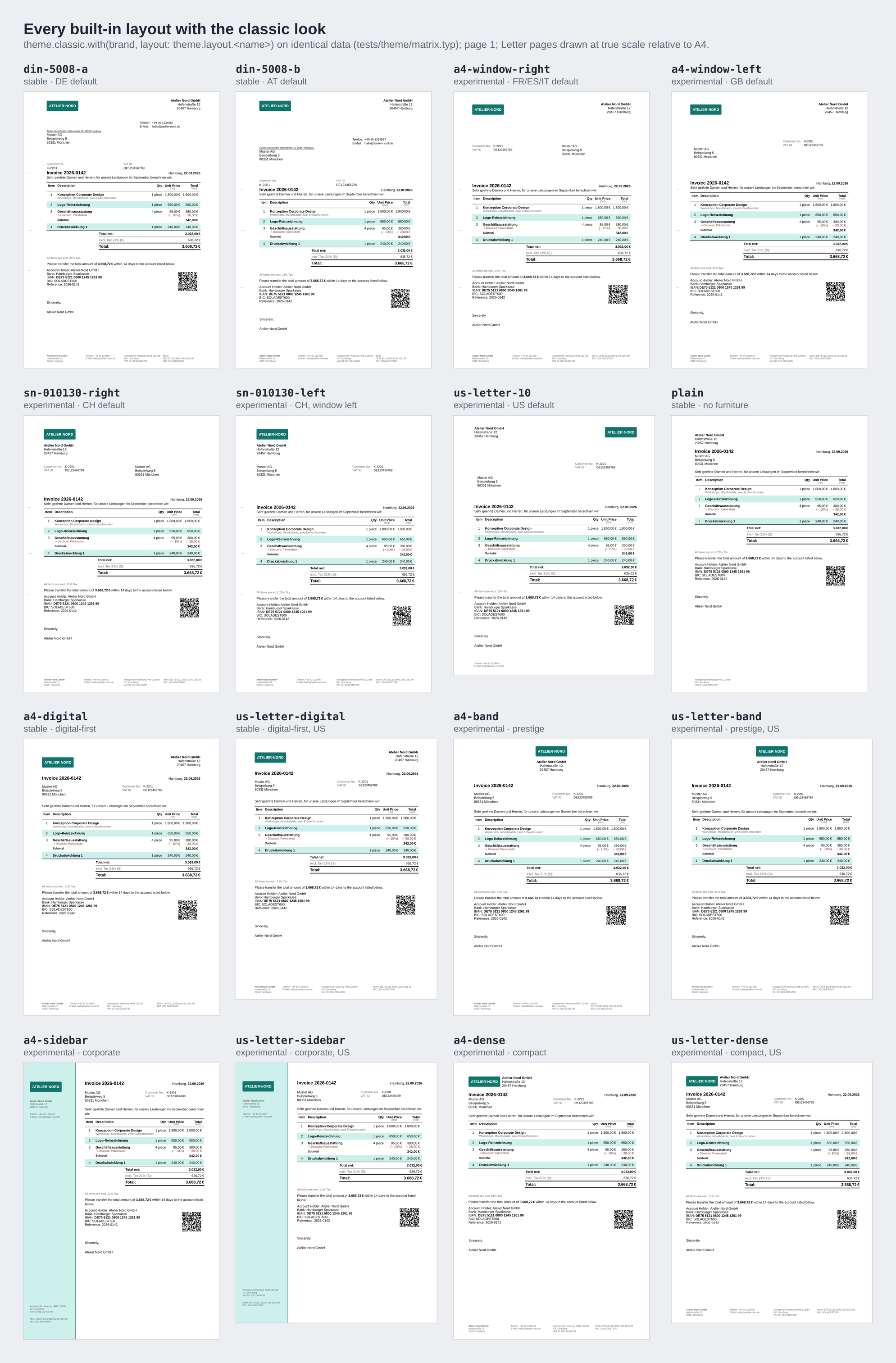
The Swiss layouts reserve no zone for a QR-bill; see Swiss QR-Bill Zone. The band layouts print to the edge of the sheet, which most office printers cannot do: they are meant for PDF invoices.
Layout by Region
Without layout:, a preset picks its page master from the sender's country, because paper and envelopes belong to the sender: an English invoice from Germany still goes into a German envelope. The country is taken from sender.country (a value of the country module), else from sender.region, else from the locale's region. An explicit layout: always wins.
#import "@preview/invoice-pro:0.6.0": *

// layout: auto (the default) follows the sender: an Austrian sender gets din-5008-b
#show: invoice.with(
  locale: locale.de-at,
  sender: (
    name: "Kaffeehaus Weber GmbH",
    address: "Kärntner Ring 5",
    city: "1010 Wien",
    country: country.at,
    vat-id: "ATU12345678",
  ),
  recipient: (
    name: "Muster AG",
    address: "Beispielweg 5",
    city: "1020 Wien",
  ),
  invoice-nr: "2026-0142",
  theme: theme.classic, // pin a page master with theme.classic.with(layout: ..)
)

#line-items[
  #item([Catering, 40 guests], price: 1200)
]
The window layout for each region:
| Sender's country | theme.layout.for-region(..) |
|---|---|
| DE, and unknown ones | din-5008-a |
| AT | din-5008-b |
| CH | sn-010130-right |
| FR, IT, ES | a4-window-right |
GB (also uk) | a4-window-left |
| US | us-letter-10 |
Each preset turns the region into its own layout family:
| Preset | layout: auto resolves to |
|---|---|
classic, boxed | for-region(region) |
elegant | for-region(region), with din-5008-b where that gives din-5008-a |
plain | plain-for-region(region) |
corporate | sidebar-for-region(region) |
prestige | band-for-region(region) |
bold, technical, soft | digital-for-region(region) |
compact | dense-for-region(region) |
The region functions are public, so you can use them yourself, for example when a job file names the region:
| Function | Returns |
|---|---|
for-region(region, default: din-5008-a) | The window layout of the table above; any other region gives default. |
paper-for-region(region) | "us-letter" for us, else "a4". |
digital-for-region(region) | us-letter-digital on Letter paper, else a4-digital. |
plain-for-region(region) | plain on the region's paper. |
sidebar-for-region(region) | us-letter-sidebar on Letter paper, else a4-sidebar. |
band-for-region(region) | us-letter-band on Letter paper, else a4-band. |
dense-for-region(region) | us-letter-dense on Letter paper, else a4-dense. |
region is an ISO 3166 code in any case; none and unknown codes fall back.
#let job = (region: "us") // e.g. json("job.json")

#show: invoice.with(
  theme: theme.classic.with(
    layout: theme.layout.digital-for-region(job.region),
  ),
  // sender: .., recipient: .., invoice-nr: ..
)
Layout Keys
| Key | Type | Default | Description |
|---|---|---|---|
name | str | "plain" | Shown in error messages. |
paper | str | dictionary | "a4" | A Typst paper name, or (width: length, height: length). height: auto is a continuous roll. |
flipped | bool | false | Landscape. |
margin | dictionary | (top: 20mm, right: 20mm, bottom: auto, left: 25mm) | Partial patches fold. bottom: auto is computed from the tallest footer (see below). |
header-ascent | relative | 30% | Passed to set page. |
footer-descent | relative | 30% | Passed to set page; must stay below 100 %. |
footer-clearance | length | 5mm | The last footer line ends at least this far above the edge of the sheet. |
body-top | auto | length | auto | Where the body starts on page 1. auto: below the lowest reserving area plus body-gap. |
body-gap | length | 4.23mm | Space between the reserving areas and the body. |
stationery | none | "pre-printed" | dictionary | none | See Stationery. |
marks | none | dictionary | none | Fold and punch marks: (fold: array, punch: length or none, left: length, length: length, stroke: stroke). See Marks. |
envelopes | array | () | Envelope records for the fit check and the print proof. |
proof | bool | array | false | The print-proof overlay; see Envelopes and Print Proofs. |
areas | dictionary | the standard areas | Named areas, in drawing and reading order. none removes one. |
The bottom margin is computed. With margin.bottom: auto (every built-in layout), the bottom margin is the tallest footer plus footer-descent and footer-clearance, at least 20 mm, so the legal footer can never run off the sheet. A one-page invoice is sized for its own footer. An explicit bottom margin that is too small for the footer is a lint/footer-fit issue: a draft marks the overflow, strict stops.
Areas
An area is a region of the page that hosts parts. Its place decides how it is drawn:
place | Drawn |
|---|---|
"fixed" | At an absolute position (left/right, top/bottom). On page 1 it is part of the tagged content and pushes the body down. |
"before" | In the flow, above the body (page 1). |
"after" | In the flow, below the body. |
"header" | In the running header of every page that pages selects. |
"footer" | In the running footer of every page that pages selects. The computed bottom margin makes room for it. |
"background" | Behind the page content: marks, bands, rails. |
"foreground" | Above the page content: stamps. |
Every layout has the standard areas marks, letterhead, address, info, references, title, continuation, page-number and footer. A layout that does not define one gets an empty stub, so patches that name a standard area work on any layout.
Area Fields
| Field | Type | Default | Description |
|---|---|---|---|
place | str | "fixed" | See the table above. |
pages | auto | "all" | "first" | "rest" | "last" | "not-last" | auto | auto: "first" for fixed and flow areas, "all" for headers, footers and layers. |
left, right | auto | length | ratio | relative | auto | Horizontal anchor of a fixed area or a layer. Setting one clears the other. |
top, bottom | auto | length | ratio | relative | auto | Vertical anchor. Setting one clears the other; bottom needs a height. |
width, height | auto | length | ratio | relative | auto | auto: the paper width for fixed areas, the text width in the flow; the content height. |
parts | array | () | Part names, content or functions (ctx, view) => content, in reading order. |
arrange | "stack" | "row" | dictionary | function | "stack" | How the cells are arranged; see below. |
gap | length | derivation | spacing.medium | Space between the cells. |
align | alignment | top + start | Alignment of the area's content. |
cell-align | auto | alignment | array | auto | Alignment per cell; an array is indexed by cell, its last entry repeats. Wins over arrange.align. |
par | dictionary | (:) | set par arguments for the cells, such as (leading: 0.5em); values may be derivations. |
inset | length | dictionary | 0pt | Padding inside the area; partial patches fold. |
fill | none | color | gradient | tiling | derivation | none | Background of the area. |
stroke | none | stroke | dictionary | derivation | none | Border of the area. |
radius | length | relative | dictionary | derivation | 0pt | Corner radius of fill and border. |
rule | none | dictionary | derivation | none | A line outside the box, (side: top or bottom, stroke:, gap:). It adds no height. |
text | dictionary | (:) | set text arguments for the cells, such as (size: 7pt); values may be derivations. |
stationery | bool | false | The area belongs to the letterhead: it is dropped when the layout's stationery is not none. |
reserve | auto | bool | auto | Whether the area pushes the body down on page 1. auto: fixed first-page areas and first-page background bands with a height. |
isolate, float | bool | false | 0.6.x preview: a regulated, brand-immune zone that floats to the bottom edge (used by reserve-qr-bill). |
arrange takes these forms:
| Value | Arrangement |
|---|---|
"stack" | The cells one below the other, separated by gap. |
"row" | The cells side by side. |
(columns: .., align: ..) | A grid with these columns; gap is the gutter. |
(rows: .., align: ..) | A grid with these rows; gap is the gutter. |
(.., skip-empty: true) | With columns or rows: an empty cell is left out with its track and its align entry where these list one per cell, so the other cells share the space. The legal footer of a4-digital uses it: without extra, the contact column gives its width to the others. |
(ctx, cells, area) => content | Experimental. cells is an array of (name, body), area the (width, height) inside the inset. |
An area whose cells are all empty draws nothing, unless it has an explicit height.
A preset's look may patch only the style fields of an area: fill, stroke, text, inset, arrange, gap, align, cell-align, par, radius and rule. Geometry belongs to the layout, so any look works on any layout.
Patching Areas
theme.custom.area(name, ..fields) patches an area of whatever layout is active. Fields you leave out keep their value.
#show: invoice.with(
  theme: theme.classic.with({
    import theme.custom: *
    brand(logo: image("logo.svg", alt: "Atelier Nord"))
    area("letterhead", parts: ("sender", "logo")) // the logo moves to the right
    area("references", none) // no reference row above the title ..
    area("info", parts: ("sender-details", "reference-list")) // .. the references go next to the address
    area("continuation", none) // no header on following pages
    area("footer", text: (size: 6.5pt))
  }),
  // sender: .., recipient: .., invoice-nr: ..
)
| Call | Effect |
|---|---|
area("address", top: 50mm) | Moves an existing area; the other fields stay. |
area("address", left: 22mm) | Sets left and clears right: the window moves to the other side. |
area("continuation", none) | Removes the area. Removing an area the layout lacks does nothing. |
area("stamp", place: "foreground", ..) | A patch with place adds a new area (or re-creates a removed one). |
A layout patch applies to the final layout, wherever it stands in the chain. For company-wide geometry, derive a layout instead.
Deriving a Layout
theme.layout.derive(base, ..patches) returns a new layout from an existing one and layout patches. The derived layout keeps the declared envelopes, so the fit check covers the new window position.
// A company-specific window: geometry lives in a derived layout
#let our-window = theme.layout.derive(theme.layout.din-5008-a, {
  import theme.custom: *
  area("address", left: 24mm, top: 40mm)
  area("info", top: 45mm)
  page(margin: (bottom: 35mm))
})

#show: invoice.with(
  theme: theme.classic.with(layout: our-window),
  // sender: .., recipient: .., invoice-nr: ..
)
derive accepts only layout patches (page, stationery, marks, envelopes, proof, area) or dictionaries of the form (layout: (..)).
Marks
Fold and punch marks are layout data, drawn by the marks part in the marks area.
| Patch | Effect |
|---|---|
theme.custom.marks(none) | No marks at all (digital invoices). |
theme.custom.marks(punch: none) | Fold marks only. |
theme.custom.marks(fold: ()) | Punch mark only. |
theme.custom.marks(fold: (105mm, 210mm)) | Other fold positions; on a layout without marks this adds marks again. |
The mark fields are fold (array of lengths from the top), punch (length or none), left (distance from the left edge), length and stroke (default: strokes.hairline in colors.text).
Stationery
stationery tells the frame what the paper already carries.
| Value | Effect |
|---|---|
none (default) | The theme draws everything. |
"pre-printed" | Printing on letterhead paper: every area marked stationery: true (letterhead and footer in the window layouts) is dropped. |
(first: content, rest: content) | Letterhead art under page 1 and the following pages, stretched to the sheet. The stationery: true areas are dropped as well. |
One document can serve all three outputs:
#let mode = sys.inputs.at("output", default: "pdf") // print | pdf | einvoice

#show: invoice.with(
  theme: theme.classic.with(layout: theme.layout.din-5008-b, {
    import theme.custom: *
    if mode == "print" { stationery("pre-printed") }
    if mode == "pdf" {
      stationery((
        first: image("letterhead-1.svg"),
        rest: image("letterhead-2.svg"),
      ))
      area("continuation", none) // the art of following pages has its own header
    }
    if mode != "print" { marks(none) }
  }),
  zugferd: if mode == "einvoice" { "basic" },
  // sender: .., recipient: .., invoice-nr: ..
)
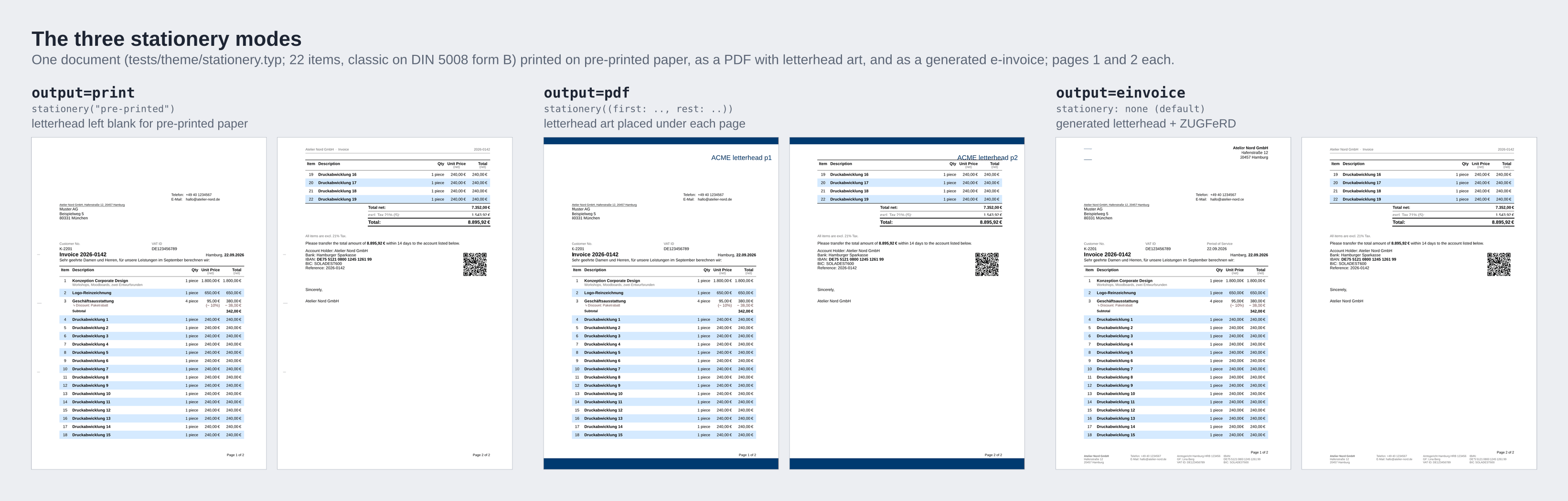
PDF/A and PDF/UA exports cannot embed PDF images (a Typst limitation). Convert letterhead art to SVG; a PDF image is reported as lint/pdf-image-stationery.
With stationery, the letterhead no longer shows the supplier's name and tax number, so the requirements for them are waived (see What Every Invoice Layout Must Host).
Envelopes and Print Proofs
A folded sheet moves inside its envelope. The recipient box of every window layout is placed where it shows through the window in every position of the sheet, with 2 mm clearance, for all declared envelopes: at least five lines of 60 mm (four on US #10).
An envelope record:
| Field | Type | Description |
|---|---|---|
name | str | Used in messages and in proof(..). |
size | (length, length) | Outer width and height of the envelope. |
window | dictionary | (left or right, top or bottom, width, height), measured on the front of the envelope with the flap edge up. |
fold | auto | array | Fold positions of the sheet. auto: the layout's marks.fold. |
note | str | Optional: the source of the measurements. |
theme.layout.envelope holds 21 records: din-dl, din-c6-5, din-c5-a, din-c5-b, din-c4-a, din-c4-b, ch-c5-6-right, ch-c5-right, ch-c5-6-left, ch-c5-6-left-din, ch-c5-left, fr-dl-right, fr-c5-right, it-11x23-right, es-americano-right, es-americano-right-25, uk-dl, uk-dl-22, uk-c5, us-10 and us-10-5-8. Their values are provisional. theme.layout.folded(folds, ..envelopes) fixes the fold of envelopes that fold with the layout, so the fit stays right when marks(none) removes the printed marks.
| Patch | Effect |
|---|---|
theme.custom.envelopes(..records) | Replaces the list of envelopes. A folded sheet that does not fit an envelope is a lint/envelope-<name> issue. |
theme.custom.proof(value) | true draws every envelope window on every invoice page, in both extreme positions, with the band that always shows, the fold and punch lines, the recipient box and a legend. An array of names limits it to these envelopes. |
The proof is meant for one test print that you hold against the real envelope. Tie it to an input, so it never ends up in production output:
// print one sheet with --input proof=1 and hold it against the envelope
#show: invoice.with(
  theme: theme.classic.with({
    import theme.custom: *
    envelopes(theme.layout.envelope.din-dl, (
      name: "ours-c6-5",
      size: (229mm, 114mm),
      fold: (87mm, 192mm),
      window: (left: 22mm, bottom: 16mm, width: 90mm, height: 45mm),
    ))
    proof(sys.inputs.at("proof", default: "") == "1")
  }),
  // sender: .., recipient: .., invoice-nr: ..
)
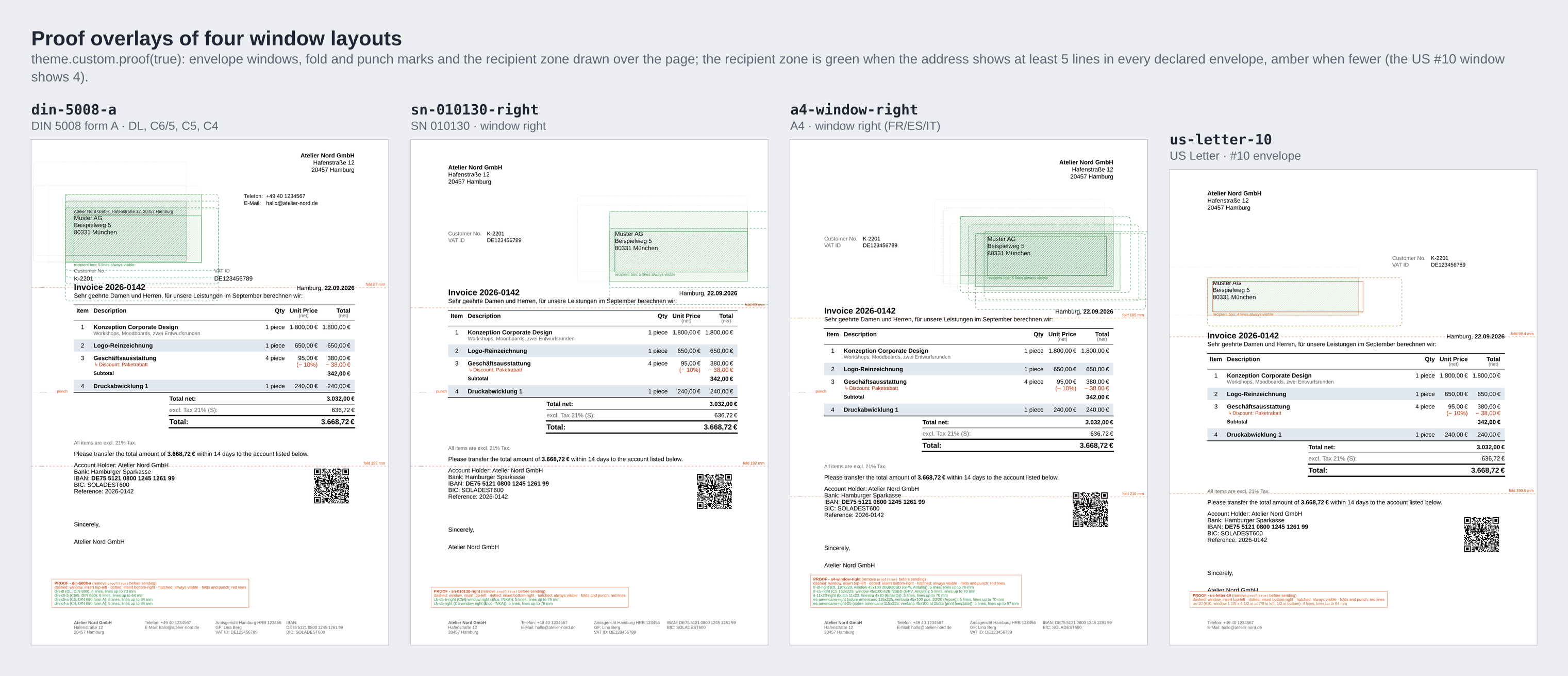
The recipient box of the proof is green when at least five lines show in every declared envelope, amber when fewer do (four on US #10, by design). The draft report page gets no overlay.
The window geometry comes from standards literature and manufacturer data (DIN 680 via DIN 5008 for DE and AT; Elco and INKA for CH; manufacturer data for FR, IT, ES and the UK; USPS for the US). The layouts other than DIN 5008 are experimental until test prints with real envelopes confirm them. Print a proof before a mailing.
Writing Your Own Format
A new format is a layout dictionary. Keys you leave out take their defaults, and the standard areas you leave out become empty stubs. An 80 mm thermal-roll receipt:
#import "@preview/invoice-pro:0.6.0": *

// Any format is data: an 80 mm thermal-roll receipt (continuous page)
#let roll = (
  name: "roll-80",
  paper: (width: 80mm, height: auto),
  marks: none,
  margin: (x: 4mm, top: 6mm, bottom: 16mm),
  areas: (
    letterhead: (place: "before", parts: ("sender",), align: center),
    title: (place: "before", parts: ("title",)),
    address: (place: "before", parts: ("recipient",)),
    footer: (place: "footer", parts: ("registration",), text: (size: 6pt)),
  ),
)

#show: invoice.with(
  theme: theme.plain.with(layout: roll, theme.custom.sizes(body: 8pt)),
  sender: (
    name: "Café Hafenblick",
    address: "Kai 1",
    city: "24103 Kiel",
    vat-id: "DE123456789",
  ),
  recipient: (
    name: "Muster AG",
    address: "Beispielweg 5",
    city: "80331 München",
  ),
  invoice-nr: "B-0815",
)

#line-items[
  #item([Cappuccino], quantity: 2, price: 3.9)
  #item([Apple cake], price: 4.5)
]
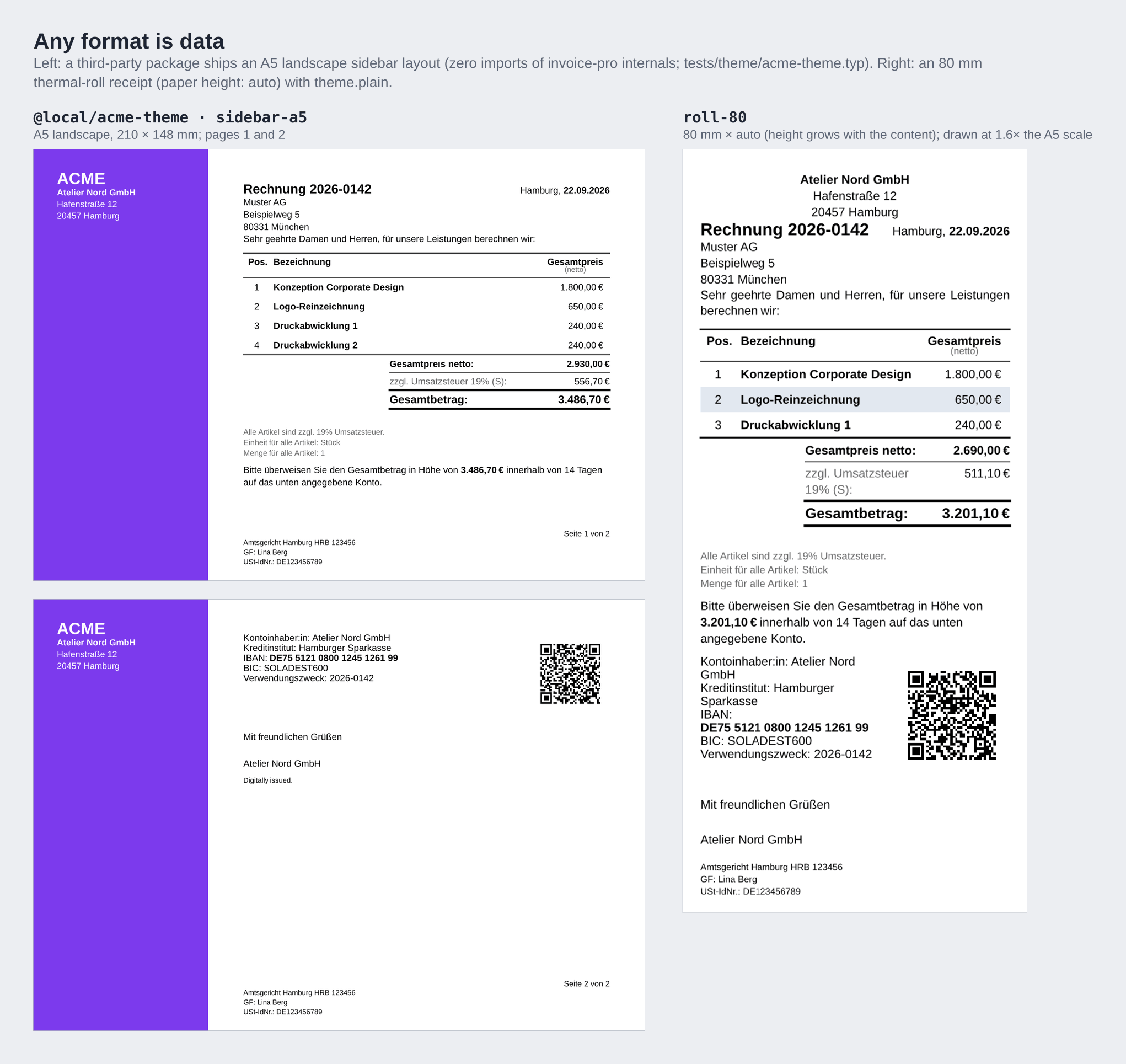
A layout can also add areas of its own and host custom parts; third-party packages ship layouts this way (Theme Packages).
What Every Invoice Layout Must Host
Some parts carry legally required output. The layout must place them:
| Role | Parts that satisfy it | Where | Waived by stationery |
|---|---|---|---|
title | title | a flow area, or a fixed area drawn on page 1 | no |
recipient | recipient | exactly one flow area or fixed area drawn on page 1 | no |
supplier | sender, company or return-address | any area drawn on page 1, including headers, footers and layers | yes |
tax-id | registration, references or reference-list | any area drawn on page 1 | yes |
In addition, the invoice number and date must appear in the first-page output; this is checked after layout. A missing role, a missing number or date, or a required part that renders nothing is a theme issue: strict stops, a draft marks it and lists it on the report page, none renders the document as it is. See Validation.
The layout is also checked for accidents: a fixed area with pages: "all" that overlaps the body on following pages (lint/overprint-*), an area that overlaps the address window (lint/window-*) and an envelope that does not take the folded sheet (lint/envelope-*).
DIN 5008 form A as data
The built-in layouts are written the same way. This listing is equal to theme.layout.din-5008-a and theme.layout.din-5008-b:
#let din-5008-a = (
  name: "din-5008-a",
  paper: "a4",
  margin: (top: 20mm, right: 20mm, bottom: auto, left: 25mm), // bottom: computed
  marks: (fold: (87mm, 192mm), punch: 148.5mm, left: 5mm, length: 2.5mm),
  envelopes: theme.layout.folded(
    (87mm, 192mm),
    theme.layout.envelope.din-dl,
    theme.layout.envelope.din-c6-5,
    theme.layout.envelope.din-c5-a,
    theme.layout.envelope.din-c4-a,
  ),
  areas: (
    marks: (place: "background", parts: ("marks",)),
    letterhead: (
      left: 25mm,
      top: 8mm,
      width: 165mm,
      height: 19mm,
      stationery: true,
      par: (leading: 0.5em),
      parts: ("logo", "sender"),
      arrange: (columns: (1fr, auto), align: (left + horizon, right + top)),
    ),
    address: (
      left: 20mm,
      top: 27mm,
      width: 85mm,
      height: 45mm,
      inset: (left: 5mm, right: 5mm),
      par: (leading: 0.5em),
      parts: ("return-address", "recipient"),
      gap: 0pt,
      arrange: (rows: (17.7mm, 27.3mm), align: (left + bottom, left + top)),
    ),
    info: (
      left: 125mm,
      top: 32mm,
      width: 75mm,
      height: 40mm,
      parts: ("sender-details",),
    ),
    references: (place: "before", parts: ("references",)),
    title: (place: "before", parts: ("title",)),
    continuation: (place: "header", pages: "rest", parts: ("continuation",)),
    page-number: (place: "footer", parts: ("page-number",), align: right),
    footer: (
      place: "footer",
      stationery: true,
      text: (size: t => t.sizes.fine, fill: t => t.colors.text-muted),
      par: (leading: 0.45em),
      parts: ("company", "contact", "registration", "bank-account"),
      arrange: (columns: (1fr, 1fr, 1fr, 1fr)),
    ),
  ),
)

#let din-5008-b = theme.layout.derive(din-5008-a, (
  layout: (
    name: "din-5008-b",
    marks: (fold: (105mm, 210mm)),
    envelopes: theme.layout.folded(
      (105mm, 210mm),
      theme.layout.envelope.din-dl,
      theme.layout.envelope.din-c6-5,
      theme.layout.envelope.din-c5-b,
    ),
    areas: (
      letterhead: (height: 37mm),
      address: (top: 45mm),
      info: (top: 50mm),
    ),
  ),
))
The recipient starts 17.7 mm into the address field, as DIN 5008 prescribes, and its text stops at 100 mm, inside a DL window even when the sheet slides sideways.
Swiss QR-Bill Zone (0.6.x Preview)
sn-010130-right and sn-010130-left reserve no zone for the Swiss QR-bill, so a Swiss invoice stays a normal letter. The second fold at 192 mm is the perforation line of a QR-bill, so a payment part added later is never folded through.
theme.layout.reserve-qr-bill(layout) is an explicit opt-in. It adds a 210 × 105 mm qr-bill area at the bottom of the last page and moves the footer above it.
This is a 0.6.x preview. Until the QR-bill component ships, the zone shows a placeholder slip without a QR code, and it may need a page of its own. It requires A4 portrait paper (lint/qr-bill-paper).
#let sn = theme.layout.sn-010130-right // what layout: auto picks for a Swiss sender
#let qr-bill = sys.inputs.at("qr-bill", default: "") == "1" // opt-in preview

#show: invoice.with(
  locale: locale.de-ch,
  theme: theme.classic.with(
    layout: if qr-bill { theme.layout.reserve-qr-bill(sn) } else { sn },
    {
      import theme.custom: *
      if sys.inputs.at("window", default: "right") == "left" {
        area("address", left: 22mm) // setting left clears right
        area("info", right: 18mm) // setting right clears left
      }
    },
  ),
  // sender: .., recipient: .., invoice-nr: ..
)